Fix URLs
Use this after you change a tenant domain, clone a site, or restore a backup whose stored URLs do not match the domain on the tenant.
Navigate to Tenancy → All Tenants, then Fix URLs on the row (page=grabwp-tenancy-pro-fix-urls).
You can also open the Fix URLs tab on the tenant.
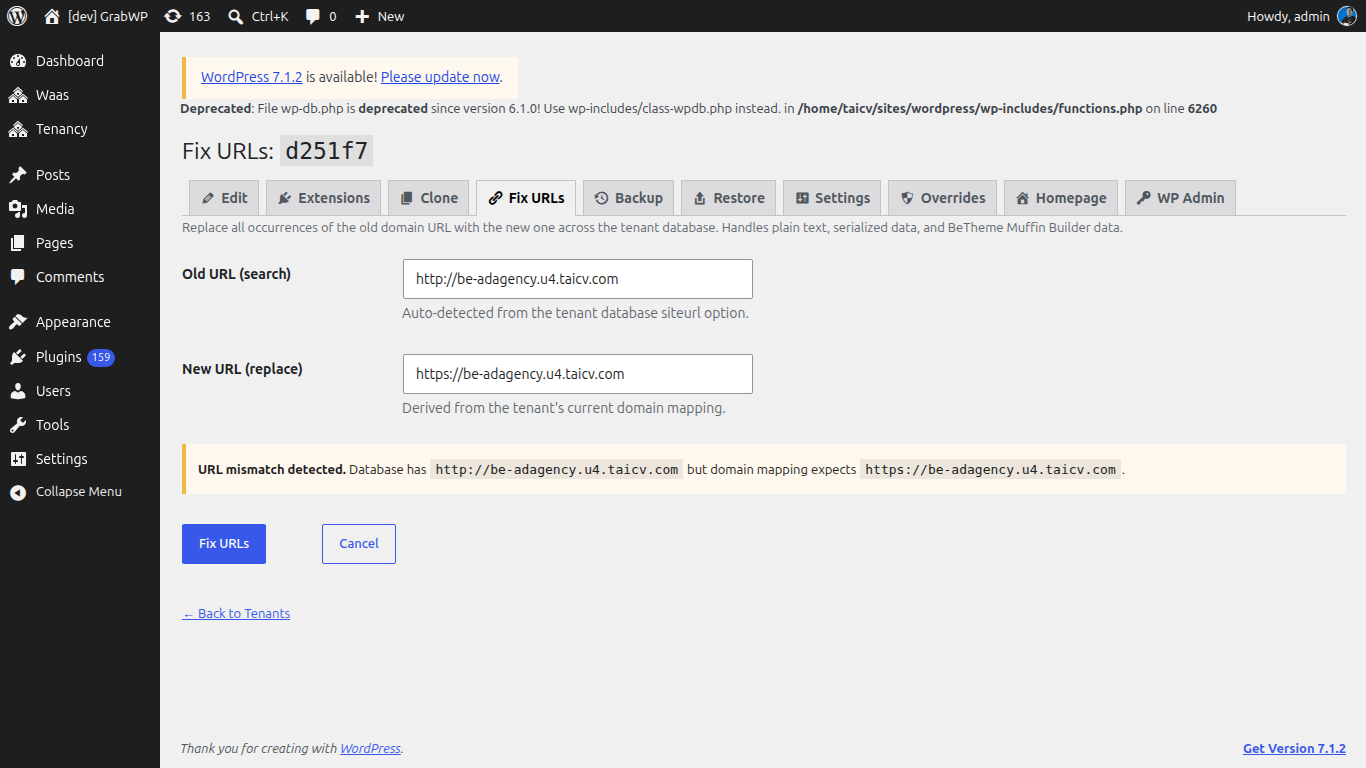
The title is Fix URLs: plus the tenant ID.
The page replaces the old URL across that tenant's database, including plain text, serialized data, and BeTheme Muffin Builder data.
| Field | Notes |
|---|---|
| Old URL (search) | Prefilled from the tenant database siteurl. Help: Auto-detected from the tenant database siteurl option. |
| New URL (replace) | Prefilled from the tenant's domain mapping. Help: Derived from the tenant's current domain mapping. |
- If they already match: The database URL already matches the expected domain. You can still run the replacement if you need to fix a different URL.
- If they differ: URL mismatch detected. The notice shows Database has
{old}but domain mapping expects{new}.
- Confirm both URLs. Edit them if you need a different pair.
- Click Fix URLs.
- Confirm This will replace all occurrences of the old URL in the tenant database. Continue?
Cancel returns to All Tenants without changing the database. Identical URLs are rejected with Old and new URLs are identical.
Verify: Open the tenant Settings tab. Siteurl and Home match the new domain. Load Homepage and confirm media and links use that domain.
The tenant domain itself is edited on Edit, not here. See Managing Tenant Sites and Domain & DNS Setup.