Install GrabWP (Free and Pro)
Short answer: install the free GrabWP Tenancy plugin from Plugins > Add New, then upload GrabWP Tenancy Pro if you bought it. A setup wizard opens and checks your server. When Tenancy > Status shows no warnings, you are ready to create sites.
Needs: Free (Pro is optional and needs the free plugin)
Before you start
- WordPress 5.0 or later (tested up to 7.1).
- PHP 7.4 or later.
- An administrator account on the main site (the
manage_optionscapability). - A normal WordPress install. GrabWP is not built for WordPress Multisite and you do not need to turn Multisite on.
Not sure your hosting fits? Read Hosting requirements.
Install in this order: the free plugin, then Pro, then WaaS and any add-ons if you sell sites.
Install the free plugin
- Go to Plugins > Add New.
- Search for GrabWP Tenancy.
- Click Install Now, then Activate.
You can also download the ZIP from wordpress.org/plugins/grabwp-tenancy and upload it under Plugins > Add New > Upload Plugin.
Install Pro
Pro does not run without the free plugin, so install that first.
- After purchase you get an email with a Customer Portal link. Open it and download the Pro ZIP. If the email is missing, search your mail (and spam) for "Polar" or "GrabWP".
- Go to Plugins > Add New > Upload Plugin.
- Upload the ZIP, click Install Now, then Activate Plugin.
- Activate your license key on Tenancy > License. See Pro license.
Until the license is active, Pro blocks creating and editing sites with the message Please activate your GrabWP Tenancy Pro license before managing tenants.
The setup wizard
When you activate a GrabWP plugin on its own from wp-admin, the GrabWP setup wizard opens once. Every step has a working default, and Skip this step and Exit setup are always there.
| Step | What it does |
|---|---|
| Welcome | Explains what GrabWP does and runs a Server check. Click Fix automatically if something is missing, then Check again. |
| Routing | Choose how visitors reach your sites: by Path (no DNS needed) or by Domain (a subdomain or the site's own domain, marked Recommended). Using both is set later in Tenancy > Settings > Routing. If tenants.php is missing, saving this step creates it. If the file cannot be written, the step names the real cause. See Domains and DNS. |
| License (Pro) | Paste your Pro key. No key yet? Skip it and activate later on Tenancy > License. |
| Site defaults (Pro) | Choose each setting (selected and marked Recommended) lets you pick the database, plugins and themes, and uploads of new sites. For plugins and themes you choose Shared from the main site, Own themes, Own plugins or Own plugins and themes. Own plugins and themes and Own uploads folder are preselected on a fresh install and marked Recommended. Use the simple setup is still there if you want one short screen. |
| First site | Creates your first site, with WordPress already installed. When the main site has a domain name, the Custom domain field suggests a subdomain made from the site title (for example my-first-site.example.com). It follows the title until you type your own domain. |
| Done | Shows the new site and its login details, then Manage sites: Open site admin (1-click), Visit site and All sites. |
The Server check on the Welcome step shows the same checks as Tenancy > Status > Plugin General: the environment cards, Hosting setup, Site can reach itself (loopback), Tenant file safety, System Information and Support diagnostics. They sit under Show the server checks, which opens by itself when something needs attention. When everything passes, the step says Everything is ready. Nothing to do here. System Information starts closed, so the step stays short. See What the server check shows.
If Site can reach itself (loopback) shows Failed, GrabWP cannot install WordPress into new sites for you, and you finish each install in the browser instead.
To open the wizard again later, use Run setup wizard on Tenancy > Status.
Check the Status page
Open Tenancy > Status. The page title is GrabWP Tenancy Status and it has three tabs: Plugin General, Base Plugin and Pro Plugin.
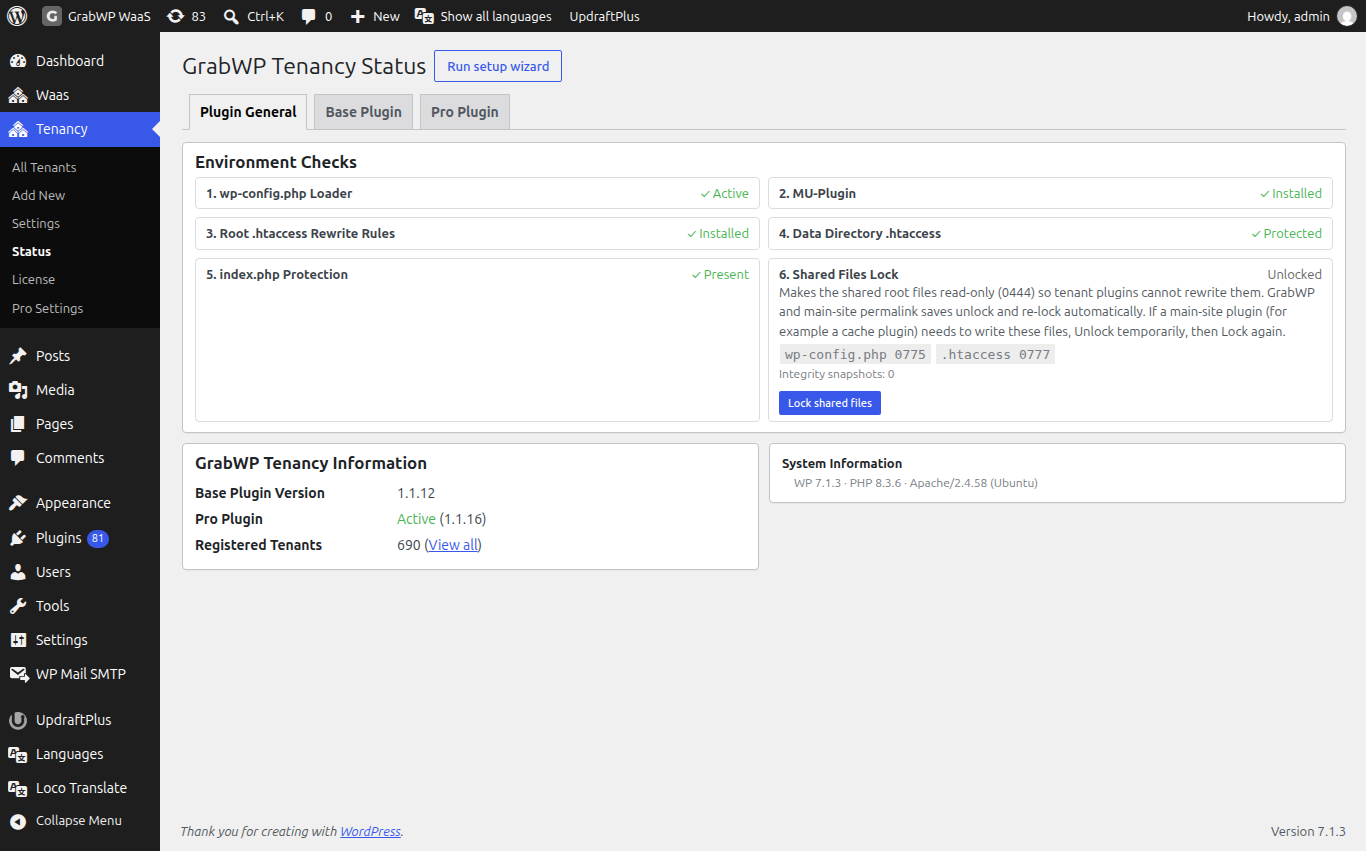
Plugin General
These cards show the pieces GrabWP adds to your server. Expand a card for Fix steps and install code, Copy Code and Auto Fix.
| Card | Healthy state | What it is |
|---|---|---|
| 1. wp-config.php Loader | ✓ Active | A short block between # BEGIN GrabWP Tenancy and # END GrabWP Tenancy in wp-config.php. It loads GrabWP early so it can tell which site a visitor asked for. |
| 2. MU-Plugin | ✓ Installed | A must-use plugin file, mu-grabwp-tenancy.php, in the mu-plugins folder. |
| 3. Root .htaccess Rewrite Rules | ✓ Installed | A block named GrabWP Tenancy in the root .htaccess, placed before # BEGIN WordPress. Apache and LiteSpeed only; it makes path addresses work. |
| Data Directory .htaccess | ✓ Protected | Blocks direct web access to the data folder, wp-content/grabwp-tenancy. |
| index.php Protection | ✓ Present | A blank index.php so the data folder cannot be listed. |
| Shared Files Lock | Locked | Makes wp-config.php, .htaccess, .user.ini and web.config read-only so plugins on client sites cannot rewrite them. |
Auto Fix writes the missing piece when WordPress can write the file. If not, the card says a manual install is required: click Copy Code and follow the steps on the card.
Since Base 1.1.15, path addresses are routed in one rewrite pass, so pretty permalinks, REST and feed URLs of path sites also work on OpenLiteSpeed (for example on xCloud). A .htaccess block written by an older version shows ⚠ Invalid content on 3. Root .htaccess Rewrite Rules. Click Auto Fix once to upgrade it.
If a cache plugin on the main site needs to write one of the locked files, click Unlock shared files, let it save, then click Lock shared files again.
The lock is a separate 0444 setting. On write requests from client sites, an integrity guard watches only the pieces GrabWP owns: the loader and HTTPS proxy blocks in wp-config.php, the GrabWP block in .htaccess, the MU-plugin and the data folder protection files. If one of those pieces is removed or changed, GrabWP puts back only its own piece and keeps every other edit an admin or plugin made to wp-config.php or .htaccess. If the file itself is invalid or truncated and cannot be repaired safely, GrabWP does not replace the whole file. It keeps its protected recovery snapshot and reports the problem on Tenancy > Status and in the debug log. To remove a GrabWP block on purpose, first turn protection off from Tenancy > Status.
On Nginx the Web Server row in System Information notes .htaccess files are not used by Nginx. Configure tenant routing in your server block instead. See Apache, LiteSpeed and Nginx.
What the server check shows
Plugin General and the wizard's Server check show the same content, in this order:
| Section | What it tells you |
|---|---|
| Environment Checks | The cards in the table above. |
| Hosting setup | Four rows: Multisite and wp-config.php (the site runs as regular WordPress, with no leftover settings that stop GrabWP), Secure address (WordPress uses https), HTTPS behind a proxy (WordPress sees https from your proxy or CDN) and Subdomains (wildcard) (new sites at *.your-domain work). The header says ✓ Ready or how many rows need attention. Some rows offer a fix button with Undo. See Hosting setup checks. |
| Site can reach itself (loopback) | OK means GrabWP can install WordPress into new sites for you. Failed means you finish each install in the browser. |
| Tenant file safety | OK when site admins cannot install or edit plugin and theme code. Unsafe when they can, with the setting, wp-config.php line or per-site override that allows it. See Tenant file safety warning. |
| System Information (closed) | Click to open. Shows GrabWP details plus WordPress, server, PHP, database, WordPress constants and writable folder values, such as PHP Version, Web Server, WordPress Multisite, Data Dir Writable and MU-Plugins Dir Writable. A row that needs attention is shown in red with a short note. |
| Support diagnostics | A summary to paste into a support request, with a Copy diagnostics button. See below. |
The Hosting setup card and Support diagnostics appear only on the main site.
Send diagnostics to support
- Go to Support diagnostics, below System Information.
- Click Copy diagnostics.
- Paste it into your support request.
The copy includes the checks above, the System Information values, and up to the last 50 lines each of the GrabWP debug log and the WordPress debug.log. GrabWP leaves out passwords, keys, salts, emails and file paths, and removes database query text from log lines. Nothing is sent anywhere until you paste it, so read it over before you share it.
Base Plugin
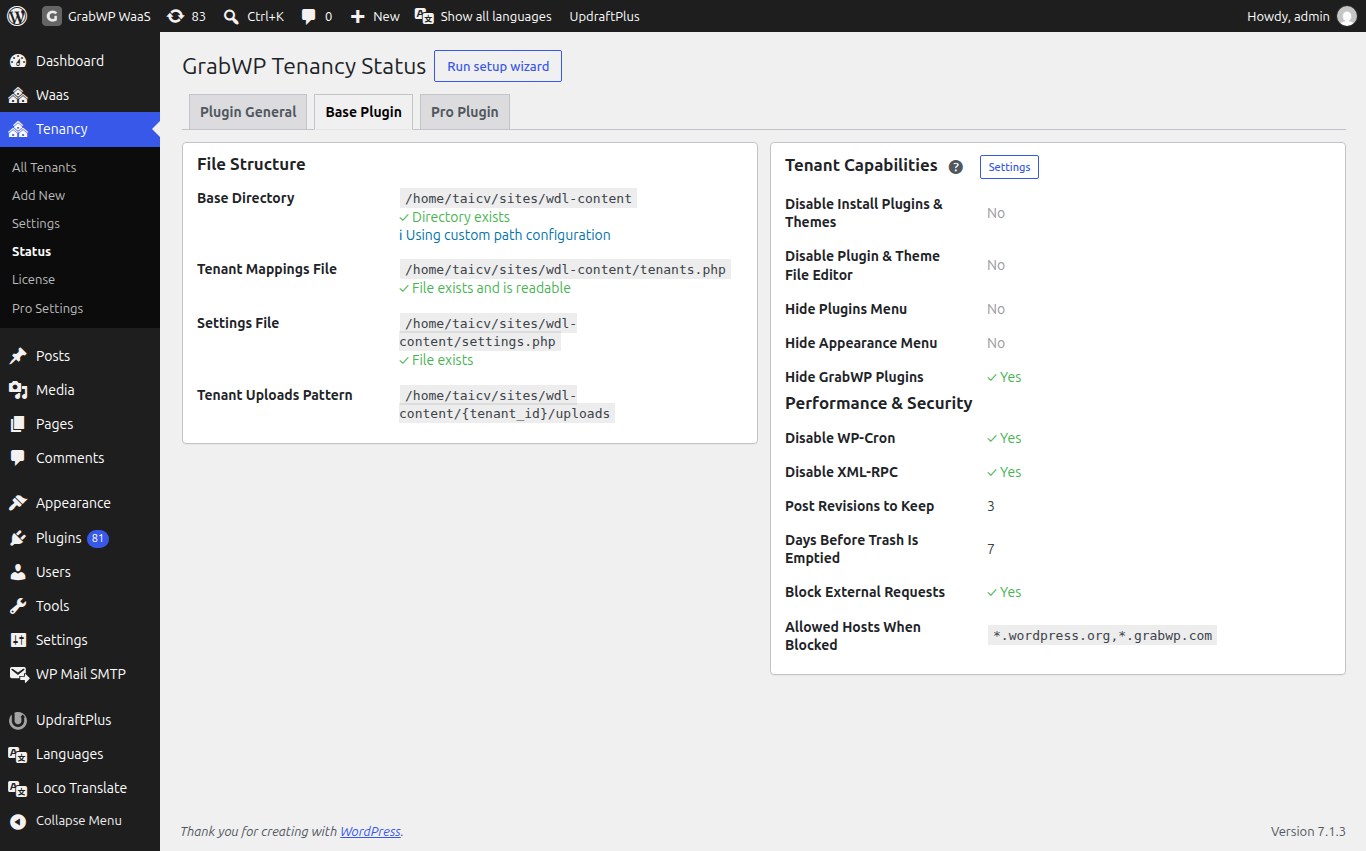
File Structure shows the data folder, the tenant mappings file (tenants.php), the settings file and where site uploads go. The capability and performance values from Tenancy > Settings are repeated here.
Pro Plugin
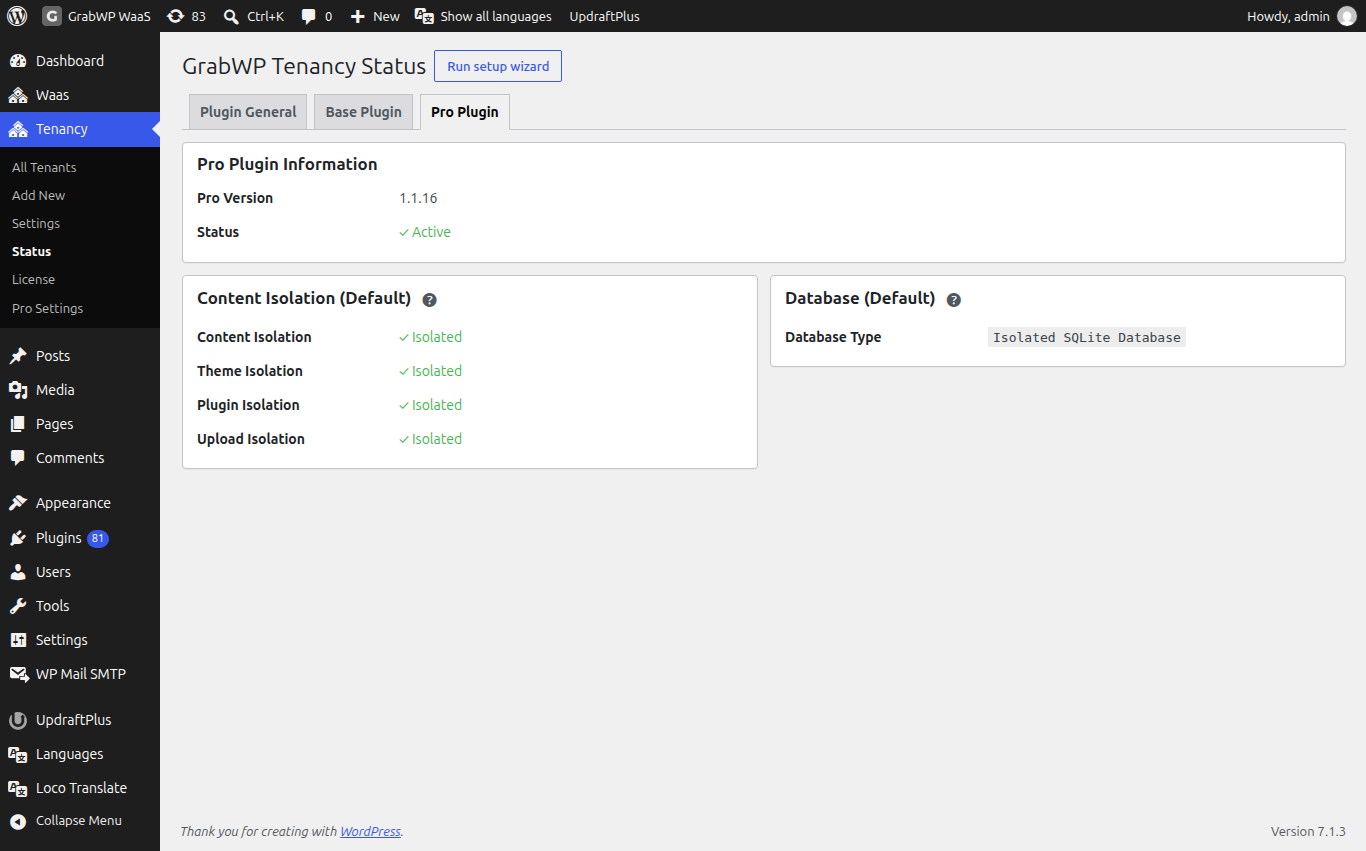
With Pro active, Pro Plugin Information shows Pro Version and Status as ✓ Active, plus the defaults for new sites. Without Pro, this tab offers Upgrade to Pro.
What Pro adds to wp-admin
- Tenancy > Pro Settings and Tenancy > License in the menu.
- Extra columns on Tenancy > All Tenants: Database, Storage, Isolation.
- Extra row icons: Plugins & Themes, Fix URLs, Backup Tenant, Restore Tenant, and a Pro version of Clone Tenant.
- A tab bar on each site: Edit, Extensions, Clone, Fix URLs, Backup, Restore, Settings, Overrides, Homepage, WP Admin.
See Where things are in wp-admin for the full map.
Warnings you may see
| You see | Go to |
|---|---|
load.php is not included in wp-config.php. (red, on every admin page) | The load.php notice |
MU-plugin is not installed. Tenant features may not work. | MU-plugin or data directory notices |
Data directory is missing. | MU-plugin or data directory notices |
Root .htaccess needs to be updated for tenant routing. | Path URLs return 404 |
Could not find the stop-editing marker in wp-config.php. Please add the line manually. | The load.php notice |
wp-config.php has settings that stop GrabWP. Remove every line below. (Hosting setup) | Settings in wp-config.php that stop GrabWP |
| Tenant file safety shows Unsafe | Tenant file safety warning |
GrabWP lost some of its own code in these files and put it back. Other edits were kept: (on Tenancy > Status) | The integrity guard above repaired a GrabWP block. No action needed unless you removed it on purpose. |
A hosting move or a tool that rewrites wp-config.php can remove the loader block. Check Tenancy > Status after any migration.
Deactivating or uninstalling
- Deactivating the free plugin removes the loader block, the MU-plugin and the
.htaccessblock, and unlocks the shared files. Site databases and uploads are not deleted. Activate it again and your sites come back. - Deactivating Pro removes the Pro screens and clears all scheduled auto backups. Site data is not deleted.