S3 storage
Short answer: by default each site's images and files stay on your server's disk. With Pro you can store them in an S3-compatible bucket instead. Add the bucket on Tenancy > Pro Settings > Storage, test it, then choose S3 for new sites or move existing sites' media with Migrate uploads now.
Needs: Pro (WaaS is not needed)
How it works
There are two storage drivers:
- Local Filesystem: uploads stay in the site's folder on your server. This is the default.
- S3-Compatible Object Storage: new uploads go to your bucket. Visitors load them from your CDN URL (optional) or from short-lived signed links.
The platform setting is the default for new sites. Each site keeps its own driver, which you can change on its Edit screen.
Leave it on Local Filesystem (default) until your bucket is ready.
Connect a bucket
Open Tenancy > Pro Settings and the Storage tab. The section is Object Storage (S3-Compatible).
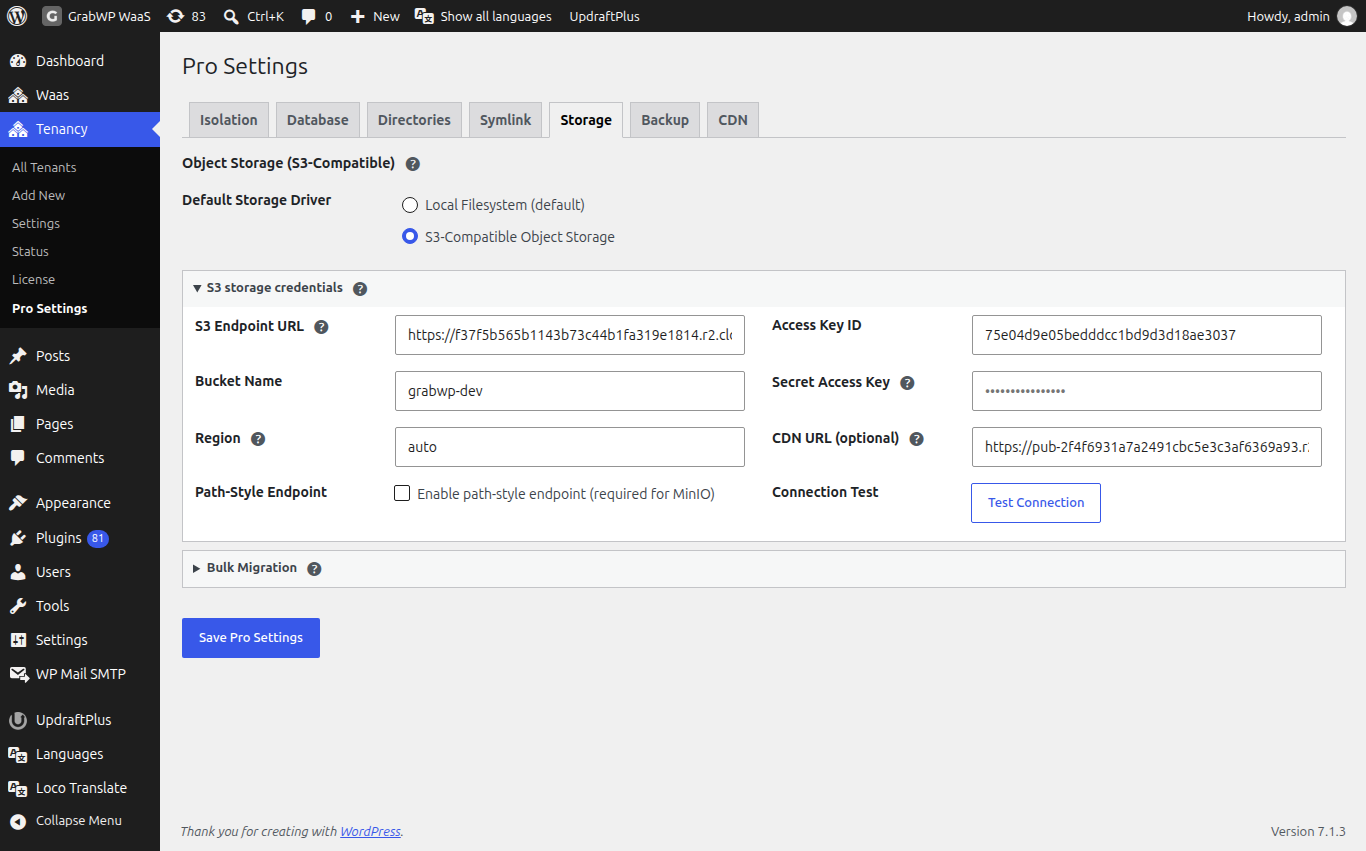
- Under Default Storage Driver, choose S3-Compatible Object Storage.
- Open S3 storage credentials and fill in the fields below.
- Click Test Connection. You should see Connection successful!
- Click Save Pro Settings.
| Field | Notes |
|---|---|
| S3 Endpoint URL | Full URL of your provider, for example https://ACCOUNT_ID.r2.cloudflarestorage.com. |
| Bucket Name | A bucket you already created, for example grabwp-uploads. |
| Region | auto for Cloudflare R2. Otherwise your bucket region, such as us-east-1 or eu-west-1. |
| Path-Style Endpoint | Tick Enable path-style endpoint (required for MinIO) for MinIO. |
| Access Key ID | Your API access key. |
| Secret Access Key | Your API secret. On later saves, leave it blank to keep the saved one. |
| CDN URL (optional) | Public address for your files, for example https://cdn.example.com. If empty, signed links are used. |
Provider values
| Provider | Endpoint | Region |
|---|---|---|
| Cloudflare R2 | https://<ACCOUNT_ID>.r2.cloudflarestorage.com | auto |
| AWS S3 | Regional endpoint, for example https://s3.us-east-1.amazonaws.com | Your bucket region |
| MinIO | Your MinIO address | Your region. Tick Path-Style Endpoint. |
| Backblaze B2 | https://s3.<region>.backblazeb2.com | Your B2 region, for example us-west-002 |
For Cloudflare R2, turn on public access or a custom domain on the bucket, then paste that address into CDN URL (optional). Provider guides: Cloudflare R2, AWS S3.
Check: create a test site, upload an image in its media library, and confirm the image loads from your bucket or CDN URL (optional).
Choose storage for one site
Once S3 is saved, Add New and Edit show Storage Driver with Local Filesystem and S3-Compatible Object Storage.
- On a new site, pick a driver and save. No migration is needed.
- On an existing site,
Saving a different driver does NOT move existing files.Click Migrate uploads now to move the files, which also switches the site's driver.
Do not switch an existing site from S3 back to local without migrating. Its existing media would stop loading.
Move media for all sites
After S3 is saved and connected, Bulk Migration appears on the Storage tab.
- Open Bulk Migration.
- Click Migrate All Tenants to S3 or Migrate All Tenants to Local.
- Confirm
This will migrate uploads for ALL tenants. Continue? - Wait for the result next to the buttons.
What a migration does, for one site or all:
- Copies every file that is not already in the target.
- If any file fails to copy, it stops. The site keeps its old driver and nothing is deleted. Fix the error and run it again.
- When all files are copied, it updates the media addresses in the site's database and switches the site to the new driver.
- It then deletes the files from the old location. Take a backup first if you want to keep them.
For big media libraries, use WP-CLI instead of the browser. It has no time limit and can keep the source files:
wp grabwp storage migrate --all --to=s3 --dry-run
wp grabwp storage migrate --all --to=s3
wp grabwp storage migrate abc123 --to=s3 --copy-only
--dry-run only lists what would be copied. --copy-only copies and switches the site, but keeps the original files. See WP-CLI commands.
The WP-CLI reference box in wp-admin shows the older name wp grabwp-pro storage. It still works and does the same thing.
Check: open a migrated site's media library and confirm existing images load. The Storage column on Tenancy > All Tenants shows S3 or Local.
Limits
- S3 is for site uploads (media). Plugins, themes and databases stay on your server.
- Backups can use the same bucket or a different one. See Backup and restore.
- Clone converts uploads when the source and target sites use different drivers. See Clone a site.