WaaS settings
Short answer: this page lists the settings on Waas > Settings (page title WaaS Settings) with their exact labels and defaults. Most operators only touch Platform Domain, the four page dropdowns, Auth Mode and Grace Period (days). The other tabs have their own pages, linked below.
Needs: Pro + WaaS
The tabs
| Tab | Covered on |
|---|---|
| General | This page |
| Appearance | Appearance |
| Signup Flow | Signup flow |
| Emails | |
| Plans | Plans |
| Benefits, Services | Benefits, services and add-ons |
| Billing Providers | This page and Payments |
| Activity Log, Provisioning | Dashboard, activity log and provisioning |
| Add-ons | Benefits, services and add-ons |
The settings are stored in the WordPress option grabwp_waas_settings.
General tab
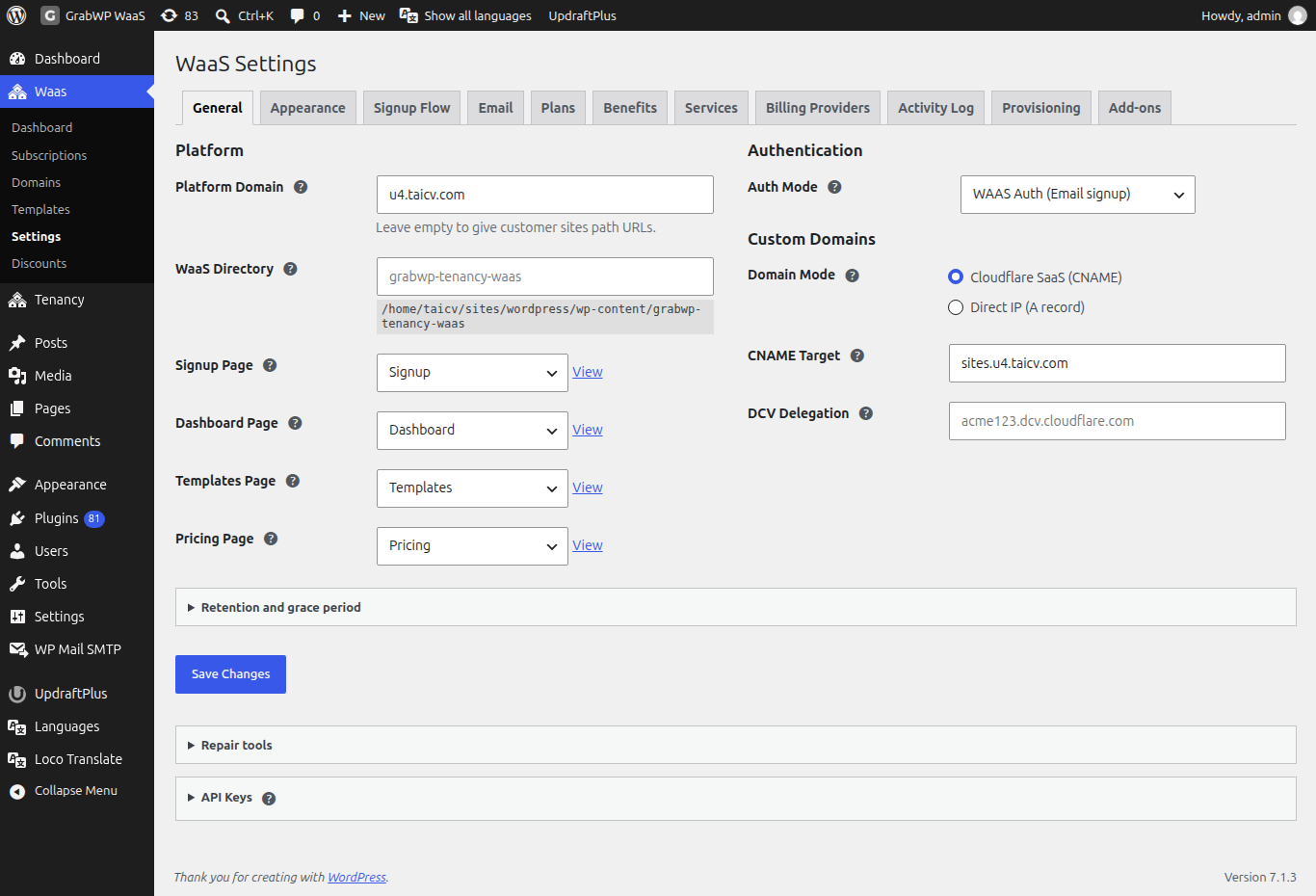
Click Save Changes after editing. The notice is Settings saved. The Repair tools and API Keys sections have their own buttons and are not saved by Save Changes.
Platform
| Label | Default | What it does |
|---|---|---|
| Platform Domain | Empty | The main domain customer subdomains are made under (example.com gives slug.example.com). No http://, no trailing slash. Hidden when routing is Path. With Path and domain routing, leaving it empty gives customer sites path URLs. |
| WaaS Directory | Empty (placeholder grabwp-tenancy-waas) | Where WaaS keeps its files: relative to the uploads folder, or an absolute path. The resolved path shows next to the field. |
| Signup Page | Select a page (falls back to /signup/) | The page with [grabwp_waas_signup]. Has a View link. |
| Dashboard Page | Select a page (falls back to /dashboard/) | The page with [grabwp_waas_dashboard]. Has a View link. |
| Templates Page | Select a page (falls back to /templates/) | The page with [grabwp_waas_templates]. Has a View link. |
| Pricing Page | Select a page (falls back to /pricing/) | The page with [grabwp_waas_pricing]. Has a View link. |
In path mode (routing set to Path under Tenancy > Settings > Routing), the Platform Domain row and the whole Custom Domains section are hidden, and the page says customer sites open under your main address with no DNS needed.
A page you pick is used only while it is published. If you move it to draft, WaaS falls back to the default address.
Authentication
| Label | Default | What it does |
|---|---|---|
| Auth Mode | WAAS Auth (Email signup) (waas_auth) | WAAS Auth (Email signup) creates the customer's account during signup; they then sign in with a code sent by email. WordPress Auth (Login required) (wp_auth) needs an existing WordPress login before a site is created. |
Custom Domains
| Label | Default | What it does |
|---|---|---|
| Domain Mode | Cloudflare SaaS (CNAME) (cloudflare_saas) | How customers connect their own domains, and which DNS instructions they see. The other choice is Direct IP (A record) (direct_ip). |
| CNAME Target | Empty (placeholder cdn.saas.example.com) | Cloudflare SaaS only. The fallback origin customers point a CNAME at. |
| DCV Delegation | Empty (placeholder acme123.dcv.cloudflare.com) | Cloudflare SaaS only. The DCV delegation value from Cloudflare, so SSL certificates validate automatically. |
| Server Public IP | Empty (placeholder 203.0.113.50) | Direct IP only. The IP customers point an A record at. |
Setup steps are on Client custom domains.
Retention and grace period
| Label | Default | Range | What it does |
|---|---|---|---|
| Retention (days) | 90 | 7 to 365 | How long activity log rows are kept before the daily cleanup removes them. |
| Grace Period (days) | 7 | 0 to 90 | How long a site stays online after its subscription ends or is cancelled, before it is suspended. 0 means at once. |
Repair tools
| Button | What it does |
|---|---|
| Create/Repair Signup and Dashboard Pages | Creates or reuses the Signup, Dashboard, Templates and Pricing pages and saves them. Notice: Signup and Dashboard pages checked. |
| Create/Repair WooCommerce Anchor Product | Creates or repairs the hidden WooCommerce product used for WaaS checkouts. Notice: WooCommerce anchor product is ready. |
API Keys
Only needed if another system calls the WaaS REST API. Keys are sent in the X-GrabWP-WaaS-API-Key HTTP header.
- Optionally enter a label (Key label (optional)).
- Click Generate New API Key.
- Copy the key from the notice. It is shown only once.
Existing keys list Label, Prefix and Created. Revoke asks Revoke this key?
Billing Providers tab
| Label | Provider | Default | What it does |
|---|---|---|---|
| Enable this provider | Every card | Off | Turns the provider on. The first enabled provider is the default fallback. Cards show Active, Needs Config or Disabled, plus Default. |
| API Base URL | Polar.sh | https://api.polar.sh/v1 | Live: https://api.polar.sh/v1. Sandbox: https://sandbox-api.polar.sh/v1. |
| API Token | Polar.sh | Empty | Polar API token. Required. |
| Webhook Secret | Polar.sh | Empty | Polar webhook signing secret. Required. |
| Organization ID | Polar.sh | Empty | Polar organization ID. |
| Secret Key | Stripe | Empty | Stripe secret key (starts with sk_live_ or sk_test_). Keep it private. |
| Publishable Key | Stripe | Empty | Stripe publishable key (starts with pk_live_ or pk_test_). |
| Webhook Signing Secret | Stripe | Empty | The webhook endpoint signing secret (starts with whsec_). Required to check signatures. |
| Thin Signing Secret (v2 Events) | Stripe | Empty | Optional. The signing secret of a v2 event destination. |
| API URL | Sepay | https://my.sepay.vn | Sepay API base URL. |
| QR URL | Sepay | https://qr.sepay.vn/img | The VietQR image address. |
| API Key | Sepay | Empty | Used to check Sepay webhooks. At least 10 letters or digits. |
| Bank | Sepay | None selected | The bank that receives payments. |
| Account Number | Sepay | Empty | Your bank account number. A Sepay virtual account number also works. |
| Account Holder | Sepay | Empty | The account holder's name. |
| Payment Code Prefix | Sepay | DH | Starts the payment code customers put in their transfer. |
| Secret API Key | Xendit | Empty | Xendit secret API key (starts with xnd_). |
| Webhook Verification Token | Xendit | Empty | The callback verification token from the Xendit webhook settings. |
| Charge Currency | Xendit | IDR | The currency sent to Xendit: IDR, PHP, VND, THB, SGD, MYR or USD. |
| Country | Xendit | Indonesia | The Xendit account country: Indonesia, the Philippines, Vietnam, Thailand, Singapore or Malaysia. |
| Anchor Product | WooCommerce | 0 | The hidden product used for checkout. 0 creates it on the first checkout. |
Stripe, Sepay and Xendit fields appear only with their add-on installed. The WooCommerce card appears only while WooCommerce is active.
Currency Settings
| Label | Default | What it does |
|---|---|---|
| Primary Currency | USD | Shown to customers on pricing pages and invoices. Plan prices are stored in it. Locked to the store currency while WooCommerce is enabled. |
| Secondary Currency | None (single currency) | Optional. For a provider that needs another currency (Sepay needs VND). |
| Exchange Rate | 25500 | How many secondary units equal 1 primary unit. Used before charging a provider that needs the secondary currency. |
| Currency Position | Left ($99.99) | Also Left with space ($ 99.99), Right (99.99$) and Right with space (99.99 $). Under Display formatting. |
| Thousand Separator | , | One character, or empty for none. Under Display formatting. |
| Decimal Separator | . | One character. Under Display formatting. |
New installs start with USD as the only currency and Polar.sh off until you configure it.