Before you buy
Short answer: GrabWP runs many separate WordPress sites from one normal WordPress install. The free plugin creates the sites and sends visitors to the right one. Pro gives each site its own database, plugins, themes and backups, and WaaS lets your customers sign up and pay for a site on their own.
Needs: Free
What GrabWP is
You install GrabWP on one WordPress site, called the main site. From there you create more sites, called tenants. Each tenant has its own content, users, settings and uploads, but every tenant runs on the same WordPress files on your server. You do not install WordPress again for each site.
A visitor reaches a tenant in one of two ways:
- By its own domain, for example
client1.com. - By a path on your main domain, for example
example.com/site/abc123. Every tenant gets a short ID of 6 lowercase letters and numbers, likeabc123.
You manage every site from one menu in wp-admin: Tenancy. When you sell sites with WaaS, a second menu appears: Waas.
GrabWP is built for a normal single-site WordPress install. It is not WordPress Multisite and does not need Multisite. If Multisite is turned on, Tenancy > Status reports it in the Hosting setup card and in System Information (GrabWP Tenancy is not designed for Multisite.).
Who uses it:
- Agencies that look after many client websites on one server.
- People who sell websites to their own customers, with plans and online payment.
- Developers and businesses that run several sites or brands and want one place to update them.
Which plugin do you need?
GrabWP comes in three layers. Each layer needs the one below it, so you always install them in this order: Free, then Pro, then WaaS.
| Plugin | What it is | Needs |
|---|---|---|
| GrabWP Tenancy (Free) | Creates and routes tenant sites. Free on WordPress.org. | Nothing |
| GrabWP Tenancy Pro | Separate database, plugins, themes and backups per site. | Free |
| GrabWP Tenancy WaaS | Sells sites: signup, plans, payments, customer dashboard. | Free and Pro |
Pick by the job you want to do:
| I want to... | Free | Pro | Pro + WaaS |
|---|---|---|---|
| Run several sites from one WordPress install | Yes | Yes | Yes |
Give each site its own domain, or a path such as /site/abc123 | Yes | Yes | Yes |
| Keep each site's posts, pages, users and uploads apart | Yes | Yes | Yes |
| Open a site's dashboard from my tenant list without a second password | Yes | Yes | Yes |
| Copy (clone) a site into a new one | Yes | Yes | Yes |
| Give each site its own MySQL or SQLite database | No | Yes | Yes |
| Give each site its own plugins and themes | No | Yes | Yes |
| Back up and restore one site, on a schedule if I want | No | Yes | Yes |
| Store uploads and backups on S3-compatible storage | No | Yes | Yes |
| Fix old URLs inside one site after a move or a clone | No | Yes | Yes |
| Change settings for one site only | No | Yes | Yes |
| Let customers pick a plan and a template, sign up and pay online | No | No | Yes |
| Offer free trials and pause sites when a payment stops | No | No | Yes |
| Give customers a dashboard and let them add their own domain | No | No | Yes |
| Take payments with Polar or WooCommerce | No | No | Yes (built in) |
| Take payments with Stripe, SePay or Xendit | No | No | Yes, plus that payment add-on |
A quick rule:
- You only build and run sites yourself, and every site can share the same plugins: Free is enough.
- Your clients need their own plugins, themes or database, or you want backups per site: get Pro.
- Customers should sign up and pay for a site without you: get Pro and WaaS.
:::info If you sell sites WaaS is in closed beta. To ask for access, email hello@grabwp.com. Payment add-ons (Stripe, SePay, Xendit) are separate plugins that you add on top of WaaS. Polar and WooCommerce payments are built into WaaS. :::
Not sure GrabWP can do a specific thing yet? Check the public roadmap, or ask us before you buy (see Getting help).
Will it run on my hosting?
Most hosting where you control your own files and settings works. Run through this short list:
- WordPress 5.0 or newer and PHP 7.4 or newer.
- A normal single-site install, not WordPress Multisite.
- Write access to
wp-config.php,wp-content/mu-pluginsandwp-content/grabwp-tenancy. GrabWP adds a small loader towp-config.phpand keeps its site data in that folder. - A server cron job. WP-Cron is turned off on tenant sites by default, so scheduled jobs (backups, renewals, emails) need a real cron job on the server.
- Nginx only: path URLs such as
/site/abc123need rules in your server block, because Nginx ignores.htaccess. - Pro with SQLite: the PHP
pdo_sqliteextension must be loaded. Without it, new sites use the shared database instead. - WaaS: the main site must send email reliably (for example through an SMTP plugin). Customers get a Verification code by email when they sign up.
After you install the free plugin, open Tenancy > Status. The Plugin General tab runs the environment checks for you, the Hosting setup card checks Multisite leftovers, https and wildcard subdomains, and System Information (click to open it) shows your PHP version, web server and whether the data folder is writable.
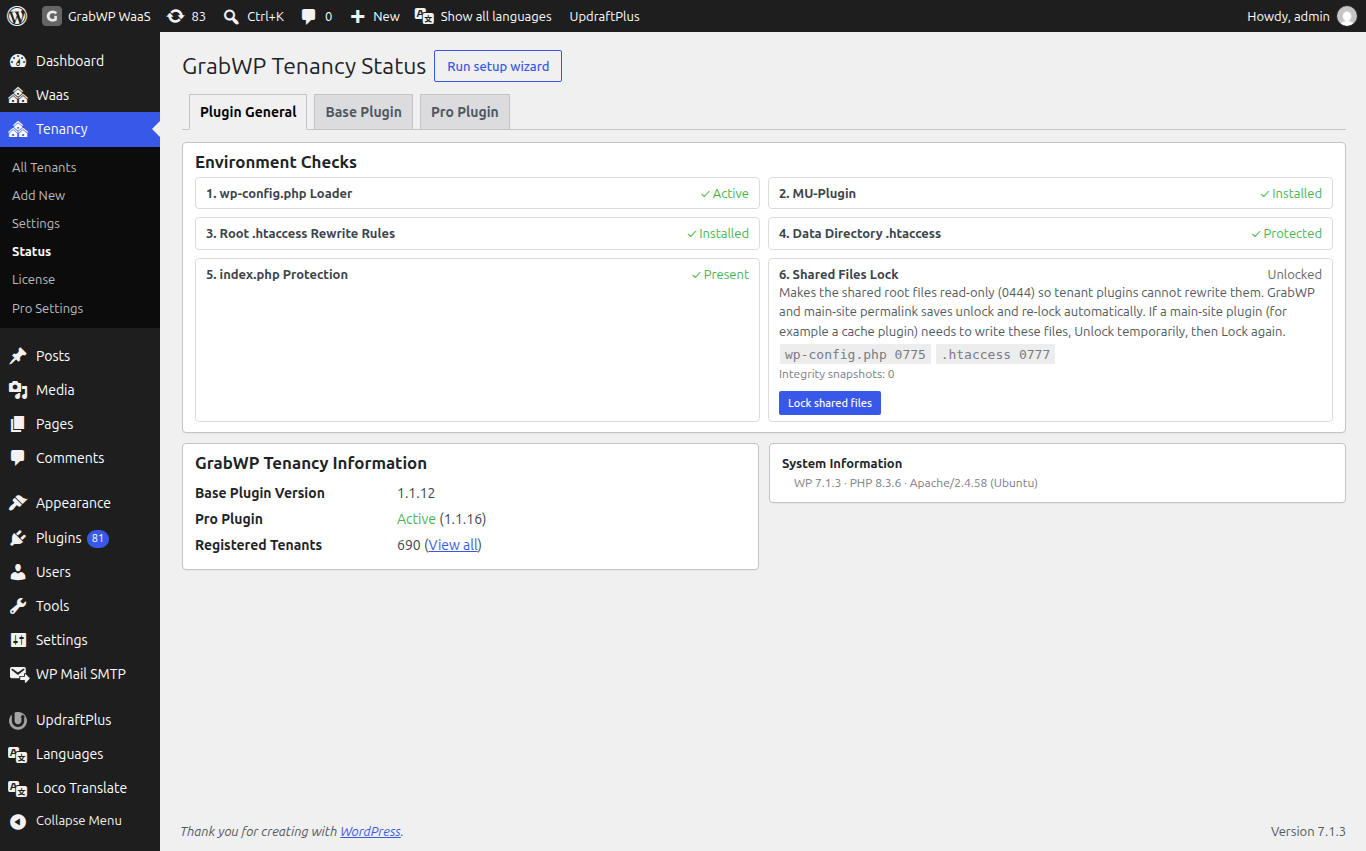
The GrabWP team tests on xCloud. Other hosts can work fine but are not tested by the team. Full details: Hosting requirements.
Trial, licence and cancelling
Plan prices live on the pricing page. The terms are the same on every Pro plan unless noted.
Free plugin. GrabWP Tenancy is free on WordPress.org and has no licence key.
Free trial. The Pro monthly and annual plans start with a 14-day free trial. You are not charged until the trial ends. Cancel before then and you pay nothing.
What one licence covers. One Pro licence covers one WordPress installation: your main site and every tenant site it runs. You do not need a licence per tenant. Every Pro plan includes every Pro feature.
Activating. After you buy, you get an email with a link to the customer portal, where you download Pro and find your licence key. The key starts with GRABWPPRO-. Enter it on Tenancy > License.
Moving to another site. On Tenancy > License, click Revoke license, then activate the same key on the new install.
Cancelling. Cancel any time from the customer portal. There is no long-term contract. You keep access until the end of the period you already paid for, and your sites keep running.
When a licence ends. Pro keeps working on your sites. You stop getting Pro updates: when a new version is out, wp-admin shows a notice with a Renew your license link.
Refunds. Because every recurring plan starts with a free trial, payments are not refunded. Use the trial to test GrabWP on your own hosting first.
Support by plan:
| Plan | Support |
|---|---|
| Free | WordPress.org support forum |
| Pro, monthly | Priority email at hello@grabwp.com |
| Pro, annual | Priority email, plus a 2-hour one-to-one onboarding session |
Next steps
- Ready to try it: Install GrabWP, then create your first site.
- Selling sites: Set up WaaS.
- Questions first: Getting help.