Quản lý subscription
Các subscription theo dõi tình trạng thanh toán và plan của từng tenant. Với vai trò admin, bạn có thể xem, chỉnh sửa và quản lý toàn bộ vòng đời của một subscription.
Truy cập vào WaaS → Subscriptions (/wp-admin/admin.php?page=grabwp-tenancy-waas-subscriptions).
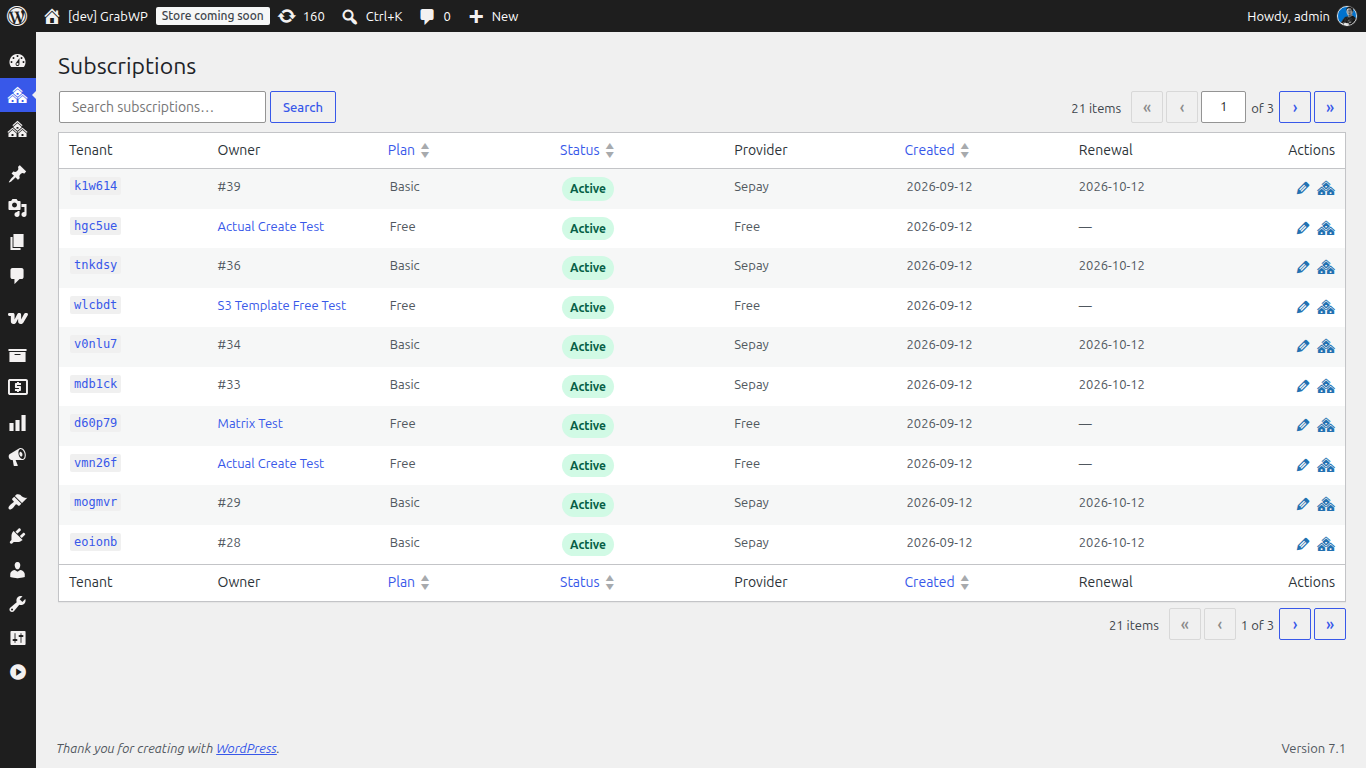
Trạng thái subscription
| Trạng thái | Ý nghĩa | Tenant site |
|---|---|---|
| Pending | Bắt đầu đăng ký, đang chờ thanh toán hoặc provisioning | Chưa thể truy cập |
| Active | Đã xác nhận thanh toán, site đã được provision | Truy cập bình thường |
| Suspended | Subscription đã hủy hoặc hết hạn (đang trong thời gian ân hạn) | Bị giới hạn hoặc khóa |
| Cancelled | Đã hủy vĩnh viễn | Có thể bị vô hiệu hóa |
Vòng đời
Pending → Active → (renewal) → Active
                 → (cancel)  → Suspended (grace period) → Cancelled
                 → (expire)  → Suspended (grace period) → Cancelled
Xem các subscription
Danh sách hiển thị toàn bộ subscription cùng với:
| Cột | Mô tả |
|---|---|
| Tenant | Slug hoặc domain của tenant site |
| Plan | Tên plan (Free, Pro...) |
| Status | Trạng thái hiện tại |
| Provider | Nền tảng thanh toán (Polar, WooCommerce...) |
| Billing Cycle | Chu kỳ thanh toán (hàng tháng / hàng năm) |
| Period End | Thời điểm kết thúc chu kỳ thanh toán hiện tại |
| Created | Ngày tạo subscription |
Bạn có thể bấm vào một subscription bất kỳ để xem chi tiết.
Chi tiết subscription
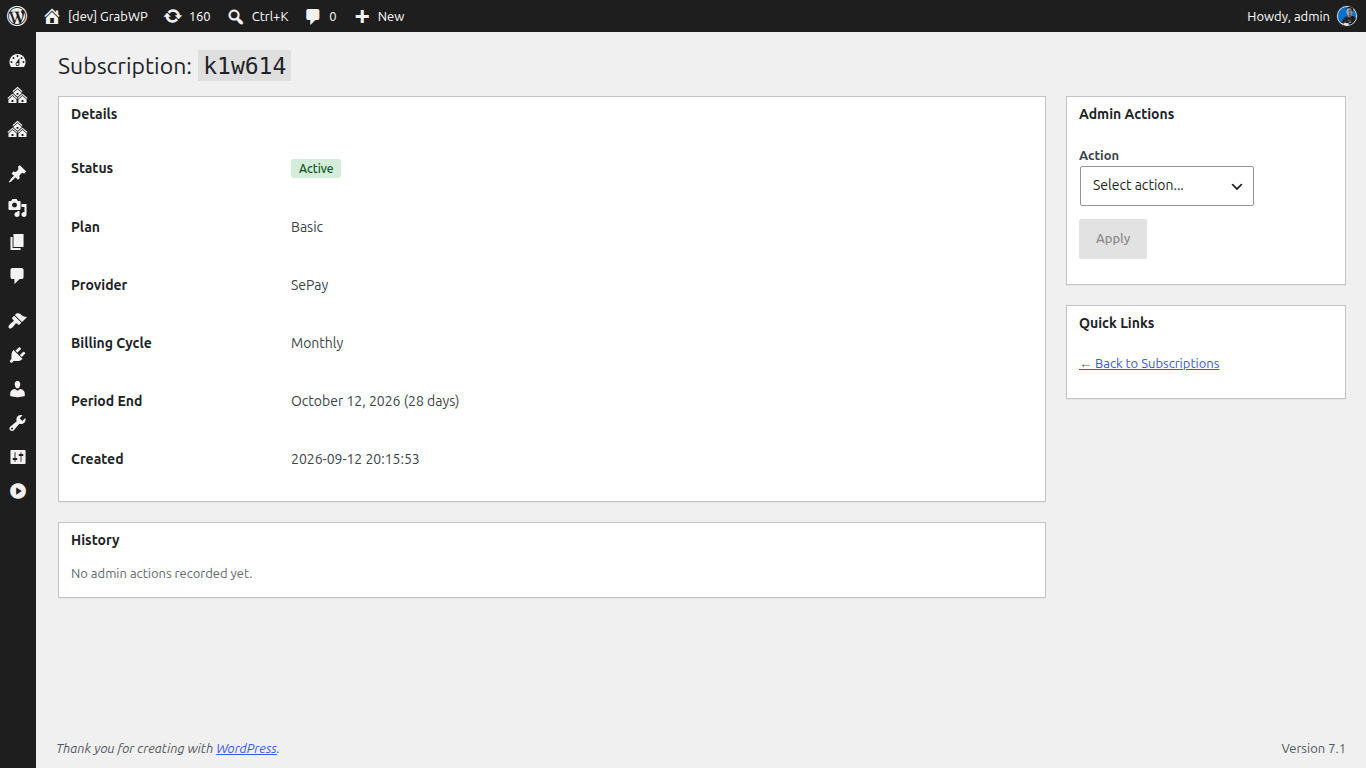
Trang chi tiết sẽ hiển thị các thông tin:
- Status badge: trạng thái hiện tại kèm màu sắc để dễ nhận diện
- Plan: plan mà tenant đang sử dụng
- Provider: nền tảng xử lý thanh toán
- Billing Cycle: thanh toán theo tháng hay theo năm
- Period End: ngày kết thúc chu kỳ hiện tại hoặc ngày gia hạn
- Provider Subscription ID: mã ID tham chiếu trên nền tảng thanh toán
- Cancellation status: trạng thái cho biết subscription có được đặt lịch hủy vào cuối chu kỳ hay không
Các thao tác của admin
Sử dụng menu dropdown trên trang chi tiết để thao tác với subscription:
Gia hạn thời gian
Kéo dài chu kỳ thanh toán hiện tại thêm một số ngày nhất định. Thao tác này rất hữu ích khi bạn muốn hỗ trợ thêm thời gian cho khách hàng đang gặp sự cố.
- Days: 1-365 (mặc định: 30)
- Reason: Bắt buộc (ghi chú lại lý do bạn gia hạn)
Đổi plan
Chuyển tenant sang một plan khác.
- Plan: Chọn một trong các plan đang active
- Reason: Bắt buộc
Lưu ý: Thao tác này sẽ thay đổi plan ngay lập tức. Nếu bạn chuyển từ plan miễn phí sang trả phí (hoặc ngược lại), hãy chắc chắn rằng subscription trên nền tảng thanh toán cũng được cập nhật tương ứng.
Cấp plan miễn phí
Cấp cho tenant quyền sử dụng một plan miễn phí trong một khoảng thời gian nhất định. Tính năng này phù hợp cho các chương trình khuyến mãi, hợp tác hoặc hỗ trợ khách hàng.
- Plan: Chọn plan muốn tặng
- Days: 1-365 (mặc định: 30)
- Reason: Bắt buộc
Tạm ngưng
Tạm ngưng subscription của tenant. Khi đó, tenant site sẽ bị giới hạn quyền truy cập.
- Reason: Bắt buộc
Kích hoạt lại
Mở lại một subscription đang bị tạm ngưng. Tenant site sẽ hoạt động bình thường trở lại.
- Reason: Bắt buộc
Thêm ghi chú
Thêm ghi chú nội bộ vào lịch sử thay đổi (audit trail) của subscription. Khách hàng sẽ không nhìn thấy ghi chú này.
- Note: Nội dung ghi chú tự do
Lịch sử thay đổi
Mọi thao tác liên quan đến subscription đều được ghi lại trong phần lịch sử ở cuối trang chi tiết:
| Cột | Mô tả |
|---|---|
| Date | Thời gian thực hiện thao tác |
| Action | Thao tác đã thực hiện (ví dụ: "Extend Period", "Change Plan") |
| Admin | Người thực hiện |
| Details | Chi tiết cụ thể (plan mới, số ngày gia hạn...) |
| Reason | Lý do thực hiện thao tác |
Thời gian ân hạn
Khi một subscription bị hủy hoặc hết hạn, tenant sẽ có một khoảng thời gian ân hạn (grace period) trước khi site bị tạm ngưng.
Bạn có thể cấu hình thời gian ân hạn tại WaaS → Settings → General → Grace Period (days).
| Cài đặt | Mặc định | Mô tả |
|---|---|---|
| Grace Period | 7 ngày | 0 = tạm ngưng ngay lập tức khi hủy |
Trong thời gian ân hạn:
- Tenant site vẫn có thể truy cập được
- Chủ sở hữu tenant sẽ thấy thông báo về việc site sắp bị tạm ngưng
- Vẫn có thể khôi phục thanh toán (ví dụ: cập nhật phương thức thanh toán trên Polar)
Tự động xử lý hết hạn
Hệ thống có một cron job chạy hàng ngày để kiểm tra các subscription hết hạn:
- Các subscription đã qua ngày kết thúc chu kỳ → được đánh dấu là hết hạn
- Các subscription hết hạn và vượt quá thời gian ân hạn → bị tạm ngưng
- Các subscription bị tạm ngưng và vượt quá thời gian chờ tiếp theo → bị hủy (nếu có cấu hình)
Khách hàng tự quản lý
Tenant có thể tự quản lý subscription của mình từ trang dashboard:
- Cancel subscription: đặt lịch hủy vào cuối chu kỳ
- Revert cancellation: hủy bỏ lệnh cancel nếu khách hàng đổi ý trước khi kết thúc chu kỳ
- Upgrade plan: chuyển hướng đến trang thanh toán để nâng cấp lên plan cao hơn
Tiếp theo: S3 Object Storage